

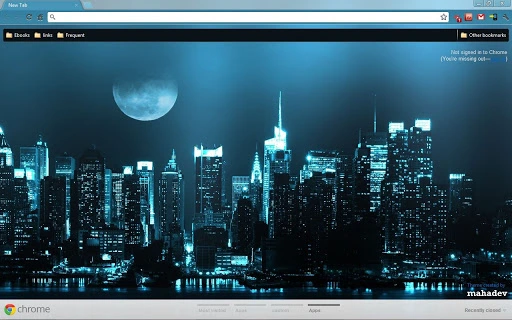
Description
Customize Your Browser with Free Themes
Theme Link: http://mahadevchromethemes.blogspot.com/2012/04/cosmopolise.html
Themes Gallery: http://mahadevchromethemes.blogspot.com/
Follow on Facebook: http://www.facebook.com/ChromeThemes
Follow on Google+: https://plus.google.com/b/104678147749011413350/
Overview
The software is a browser theme package designed to enhance the visual appearance of web browsers, particularly those compatible with Chrome-based platforms. It enables users to personalize their browsing environment with unique visual designs, offering a fresh and distinct look. The primary purpose is aesthetic customization, allowing users to align their browser interface with personal style or branding preferences. This tool is ideal for individuals seeking to improve visual engagement while browsing the web, especially those who value a personalized digital workspace.
Target users include casual internet users, digital creatives, and anyone interested in desktop customization. The software does not include functional tools or performance enhancements—its focus remains strictly on visual presentation. It is particularly useful in scenarios where users want to refresh their browser’s appearance without altering core functionality. The developer, Mahadev, has provided a thematic gallery and direct links for accessing various designs, suggesting a curated collection approach.
Exact performance details were not specified. Platform compatibility information is limited to Windows, Mac, and Linux, but specific version requirements were not listed. The developer did not provide additional system requirements.
Key Features & Capabilities
- Visual Customization – Offers a range of pre-designed themes to modify the browser’s appearance, including color schemes, backgrounds, and interface elements.
- Easy Installation – Designed for straightforward integration with compatible browsers, allowing users to apply themes with minimal steps.
- Free Access – Available at no cost, making it accessible to a broad audience seeking aesthetic improvements without financial commitment.
- Thematic Variety – Features a collection of themes, including the "Cosmopolise" design, accessible through a dedicated gallery and direct links.
- Cross-Platform Support – Compatible with Windows, Mac, and Linux, enabling consistent customization across multiple operating systems.
These features support users in transforming their browsing experience into a more visually engaging environment. For example, a user may choose a theme that matches their workspace decor or personal brand. The ease of application allows even non-technical users to personalize their browser quickly. The availability of multiple designs encourages experimentation and frequent updates to the visual layout.
User Interface, Workflow & Performance
The user interface is not directly accessible since the software is a browser theme, meaning it operates within the browser’s existing framework. Users interact with the theme through the browser’s theme management settings, where they can preview and apply designs. Navigation is consistent with standard browser behavior, relying on built-in controls for theme selection and activation.
Workflow efficiency is high due to the minimal setup process. Once downloaded, the theme can be applied in a few clicks, typically through the browser’s extensions or appearance settings. The developer did not specify resource usage details, so performance impact on CPU or RAM remains unclear. General software behavior patterns suggest that browser themes typically have negligible performance effects.
Stability is expected to align with the host browser’s reliability. Since the software is not a standalone application but a visual overlay, it does not introduce additional system processes. No reports of crashes or conflicts were provided. The developer did not mention update frequency or automatic sync capabilities.
Compatibility & System Requirements
The software is compatible with Windows, Mac, and Linux operating systems. It is designed for use with Chrome-based browsers, though specific browser versions were not listed. The installation size is 1.5 MB, which is relatively small and suitable for systems with limited storage capacity.
Exact system requirements were not listed. Compatibility information was partially provided. The developer did not specify minimum CPU, RAM, or graphics requirements. No mention was made of hardware acceleration or display resolution dependencies. Users are advised to ensure their browser supports external themes and that they have administrative rights for installation.
Pros and Cons
Pros
- Completely free to use with no hidden costs
- Lightweight installation at just 1.5 MB
- Supports multiple operating systems: Windows, Mac, and Linux
- Offers a variety of visual themes for personalization
- Simple and fast installation process
Cons
- No information on specific browser versions or compatibility details
- Performance impact on system resources was not disclosed
- Limited to visual customization—no functional enhancements
- Update frequency and maintenance status are unknown
- No official support channels or documentation provided
FAQ Section
Is this software safe to download and install?
The software is distributed through official links provided by the developer. It is a browser theme and does not include executable code that could compromise system security. However, users should only download from verified sources to avoid third-party modifications.
Can I use this theme on multiple devices?
Yes, as long as the devices run a compatible operating system and browser. The theme can be applied on Windows, Mac, and Linux machines, provided the browser supports external themes.
Do I need to update this software regularly?
Update frequency was not specified by the developer. Users should check the theme gallery periodically for new releases or changes. Automatic updates are not confirmed.
Is the software available for all browsers?
The software is designed for Chrome-based browsers. Compatibility with other browsers such as Firefox or Edge was not confirmed. Users should verify browser support before installation.
Can I use this theme offline?
Yes, once installed, the theme operates entirely offline. No internet connection is required to view or use the customized interface after installation.
Final Thoughts + CTA
This browser theme package offers a straightforward way to personalize the look of your web browser without requiring technical expertise. While it lacks advanced functionality, its focus on visual customization provides a meaningful benefit for users who value aesthetics and individuality in their digital experience. The free access and cross-platform support enhance its appeal, making it suitable for a wide range of users across different devices.
Although the software does not include performance metrics or detailed compatibility specifications, its lightweight nature and simple workflow suggest reliable use. The absence of system requirements or update details is a minor drawback, but it does not detract from the core purpose. For anyone seeking a quick, free way to refresh their browser’s appearance, this tool delivers on its promise.
Download Theme Link now
Guides & Tutorials for Cosmopolise Theme for Chrome
How to install Cosmopolise Theme for Chrome
- Click the Preview / Download button above.
- Once redirected, accept the terms and click Install.
- Wait for the Cosmopolise Theme for Chrome download to finish on your device.
How to use Cosmopolise Theme for Chrome
This software is primarily used for its core features described above. Open the app after installation to explore its capabilities.
User Reviews for Cosmopolise Theme for Chrome 0
No reviews found





